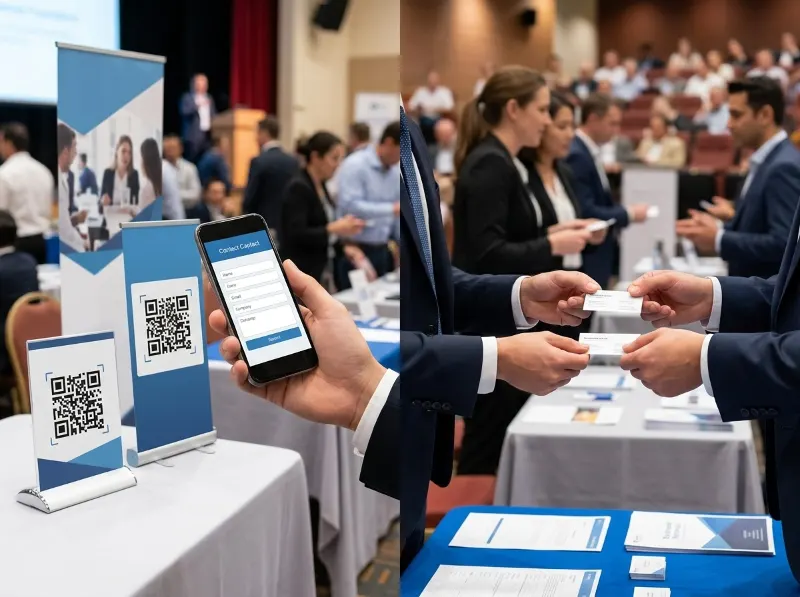
Collecting Leads at Seminars: QR Codes vs. Business Cards
If you've ever walked out of a seminar with a stack of business cards stuffed in your jacket pocket — only to find them weeks later, wrinkled and out of order — you already know the pain of old-school lead collection. Seminars are gold mines for networking and business development, but the way you capture those leads can make or break your follow-up game. Today, more and more professionals are turning to QR codes paired with digital contact forms to modernize the process. So let's talk about how it all works, and whether it actually beats the classic business card shuffle.
Why Lead Collection at Seminars Matters So Much
Seminars bring together motivated, engaged people who are already interested in a specific topic — which means the leads you collect there tend to be high quality. According to the Content Marketing Institute, in-person events consistently rank among the top channels for generating quality leads for B2B marketers. But collecting a lead is only step one. If you can't organize, follow up, and nurture that lead quickly, the opportunity fades fast. That's where your collection method becomes critically important.
The Business Card: A Classic With Real Limitations
Let's give credit where it's due — the business card has been a staple of professional networking for decades, and there's still something genuinely human about the physical exchange. However, business cards come with some well-known headaches:
- Manual data entry: Someone has to type all that information into your CRM or spreadsheet — and that's time-consuming and error-prone.
- Cards get lost: They fall out of pockets, get buried in bags, or end up in the trash after a laundry incident.
- No context: A name and phone number tells you who someone is, but not what they're interested in or how they heard about you.
- No immediate follow-up trigger: You have to wait until you're back at the office to start the follow-up process.
- Print costs: Designing, printing, and reprinting cards every time your info changes costs real money over time.
None of this means business cards are dead — but in a fast-moving seminar environment, their limitations add up quickly.
Enter the QR Code: A Smarter Way to Capture Leads
QR codes have made a massive comeback in recent years, largely accelerated by the pandemic-era push toward contactless interactions. By 2024, Statista reported that over 89 million smartphone users in the United States scanned a QR code at least once — a number that continues to grow. At a seminar, a QR code can be placed on your booth banner, presentation slide, handout, or even a small tabletop card. When an attendee scans it with their smartphone, they're taken directly to a digital contact form where they can submit their own information — accurately, instantly, and without any card swapping required.
How QRSpike Makes This Even Better
This is where a platform like QRSpike.com really shines. QRSpike lets you create a QR code that links directly to a customizable contact form. Instead of just grabbing a name and email, you can ask prospects questions that matter — like what products they're interested in, what their biggest challenge is, or how they found out about your seminar session. That kind of contextual lead data is something a business card can never give you. Once someone submits the form, their information is captured digitally and organized for you automatically — no manual entry, no lost cards.
QR Codes + Contact Forms: The Pros
- Instant, accurate data collection: Prospects type their own info, eliminating transcription errors.
- Rich lead profiles: Collect more than just contact details — gather interests, preferences, and intent signals.
- Immediate follow-up capability: Data is available in real time, so your team can start follow-up while the seminar is still happening.
- Eco-friendly and cost-effective: No printing costs, no paper waste.
- Scalable: Whether you're collecting 10 leads or 500, the process is exactly the same and just as efficient.
- Easy to update: Change your form questions or destination URL anytime without reprinting anything.
QR Codes + Contact Forms: The Cons
To be fair, no method is perfect. Here are a few things to keep in mind when going the QR code route:
- Requires a smartphone: Most professionals have one, but older attendees or those without data access may struggle.
- Scan hesitation: Some people are still wary of scanning unknown QR codes due to phishing concerns. A branded, clearly labeled code from a recognizable platform like QRSpike helps build trust.
- Needs a compelling reason to scan: You have to actively encourage people to pull out their phones and scan. A short pitch or incentive (like a free resource or giveaway entry) goes a long way.
- Internet dependency: If the venue has poor Wi-Fi or cell coverage, form submissions could be delayed.
The Human Touch Still Matters
Here's something worth acknowledging: the act of exchanging a business card is a social ritual. It signals mutual respect and interest in a way that pointing at a QR code on a banner doesn't always replicate. The good news? You don't have to choose one or the other. Many savvy seminar presenters use both — they hand over a business card and point to a QR code on the back or on a handout. The card creates the human connection; the QR code captures the organized, actionable data. Think of them as complementary tools rather than competitors.
Best Practices for Using QR Codes at Your Next Seminar
- Display your QR code prominently — on your presentation slides, table signage, and any printed handouts.
- Tell people why they should scan it — offer a resource, a discount, or entry into a drawing in exchange for their information.
- Keep your contact form short and focused — ask only what you truly need to qualify and follow up with a lead.
- Test your QR code before the event — scan it from multiple devices to make sure it works flawlessly.
- Follow up fast — one of the biggest advantages of digital lead capture is speed; use it. Studies by Harvard Business Review have shown that responding to leads within an hour makes you far more likely to have a meaningful conversation.
Getting Started With QRSpike
If you're ready to modernize your seminar lead collection strategy, QRSpike.com is a straightforward place to start. You can build a QR code that connects directly to a branded contact form, giving your prospects a smooth, professional experience from scan to submission. It's the kind of tool that makes you look organized and tech-forward — which, let's be honest, is never a bad first impression at a seminar.
Wrapping It Up
Seminars are one of the best opportunities you have to connect with motivated, relevant prospects — but only if you capture and follow up on those leads effectively. Business cards will always have a place in professional networking, but pairing them with a QR code and digital contact form strategy takes your lead collection to a whole new level. You get richer data, faster follow-up, and far less chaos sorting through a stack of bent cardstock. Give QRSpike.com a look before your next seminar — your future self (and your sales pipeline) will thank you.
References
- Content Marketing Institute — B2B Content Marketing Report: contentmarketinginstitute.com
- Statista — QR Code Usage in the United States: statista.com
- Harvard Business Review — The Short Life of Online Sales Leads: hbr.org
- QRSpike — News & Resources: qrspike.com/news